
How to Track Your Trading 212 Portfolio in 2026 (Step-by-Step)
Published: January 25, 2026
•Joseph Hughes
If you invest through Trading 212, you already have a slick app for buying and selling – but a trading app is not the same as a proper portfolio tracker. To genuinely track your Trading 212 portfolio in 2026, you want to see your true returns, dividend income, sector and geographic spread, and how you’re doing against a benchmark, all in one clear view. This step-by-step guide shows you exactly how to do that, including how to auto-sync your holdings securely using a read-only API key.
Key Takeaways
| Question | Short, Practical Answer |
|---|---|
| Can I track my Trading 212 portfolio automatically? | Yes. You can auto-sync holdings by generating a read-only API key in Trading 212 and connecting it to a tracker like InvestInsight. |
| Is connecting an API key safe? | A read-only key can view positions and cash only – it cannot place trades or move money. Keys are encrypted and you can revoke them at any time. |
| Does Trading 212 show my real returns? | It shows current value and open-position P/L, but it’s weaker on lifetime money-weighted returns, dividend history and benchmarking. |
| Can I track my ISA and Invest accounts separately? | Yes – treat them as distinct accounts so your tax-efficient ISA gains and your General Investment Account are never muddled. |
| How do I track dividends properly? | Use a dedicated dividend tracker that logs each payment and projects a forward income calendar. |
| What’s the simplest routine? | A five-minute weekly check plus a slightly deeper monthly review – that’s enough for most long-term investors. |
1. Understand What Trading 212 Shows You – and What It Doesn’t
Trading 212 is built primarily as a brokerage, not an analytics platform. Before you decide how to track your Trading 212 portfolio more seriously, it helps to know where the app is strong and where it leaves gaps.
What it does well
- Current holdings and value – a clear pie of what you own and its live market value.
- Open-position profit and loss – how much each position is up or down since you bought.
- Order history – a record of every buy and sell you’ve made.
- Pies and AutoInvest – handy for recurring, diversified investing.
Where the gaps appear
- Lifetime, money-weighted returns. The app focuses on open positions, so it’s hard to see your true return once you factor in deposits, withdrawals and sold positions.
- Dividend history and forecasting. Dividends land in your account, but there’s no rich income calendar or forward projection.
- Benchmarking. There’s no simple “am I beating the S&P 500?” comparison.
- Cross-account and cross-broker view. If you also hold a pension or crypto elsewhere, Trading 212 only ever shows the Trading 212 slice.
The single most useful question a tracker answers is one most brokerage apps quietly avoid: “Would I have been better off just buying an index fund?” If you can’t see that, you can’t really judge your own investing.
2. Decide How You’ll Track: Manual vs. Auto-Sync
There are two broad ways to keep a tracker up to date.
Manual entry
You type in each holding, buy price and quantity yourself. It’s completely private and works with any broker, but it’s tedious and easy to let drift out of date – especially if you use AutoInvest pies that buy fractional shares every week.
Auto-sync via a read-only API key
This is where 2026 gets easier. Trading 212 lets you generate an API key – a long secret string that grants programmatic access to your account data. Paired with a read-only permission, a tracker such as InvestInsight can pull your positions and cash automatically, so your dashboard stays current without manual data entry. The rest of this guide assumes you’ll use auto-sync, because it’s the most reliable way to keep an accurate picture over time.
3. Generate a Read-Only API Key in Trading 212
The exact wording in the app changes from time to time, but the flow is consistent. On the Trading 212 web platform (API access is typically managed from the browser version rather than the mobile app):
- Open Settings and look for the API section.
- Choose to generate a new API key.
- When asked about permissions, select read-only scopes – you want the key to be able to view your portfolio, orders and account data, and nothing more.
- Do not grant any permission related to placing orders if your only goal is tracking.
- Copy the generated key somewhere safe for a moment – you’ll paste it into your tracker once and then it’s stored securely.
Treat an API key like a password. Never share it in a screenshot, email or public forum, and only ever paste it into a service you trust.
A note on ISA vs. Invest keys
Depending on how Trading 212 structures access at the time, you may be generating a key that covers a specific account. If so, keep track of which key maps to your Stocks & Shares ISA and which maps to your Invest (General Investment Account). We’ll come back to why that separation matters in Section 6.
4. Understand the Security Model Before You Connect
It’s completely reasonable to pause before handing any key to a third party. Here’s an honest, accurate picture of what a read-only connection can and cannot do.
What a read-only key can do
- See your current positions, quantities and cash balance.
- Read your order and transaction history so your tracker can reconstruct performance and dividends.
What it cannot do
- It cannot place trades. A read-only key has no authority to buy or sell anything.
- It cannot move or withdraw money. Transfers and withdrawals are outside its scope entirely.
- It cannot change your account settings or password.
How InvestInsight handles the key
When you connect Trading 212 to InvestInsight, the key is encrypted at rest and used only to read your data on your behalf. You are always in control: you can revoke the key at any time – either by deleting it in Trading 212 or disconnecting inside InvestInsight – and the connection immediately stops working. Revoking a key does not affect your holdings or your Trading 212 account; it simply cuts off read access.
The golden rule: a tracker should only ever read. If any tool asks for trade or withdrawal permissions just to display your portfolio, that’s a red flag.
5. Connect Trading 212 to InvestInsight
With your read-only key in hand, connecting is quick:
- In InvestInsight, choose to add a Trading 212 connection.
- Paste your read-only API key when prompted.
- Give the connection a clear label, e.g. “Trading 212 – ISA”.
- Let the initial sync run – your positions, cash and history are imported and your dashboard populates.
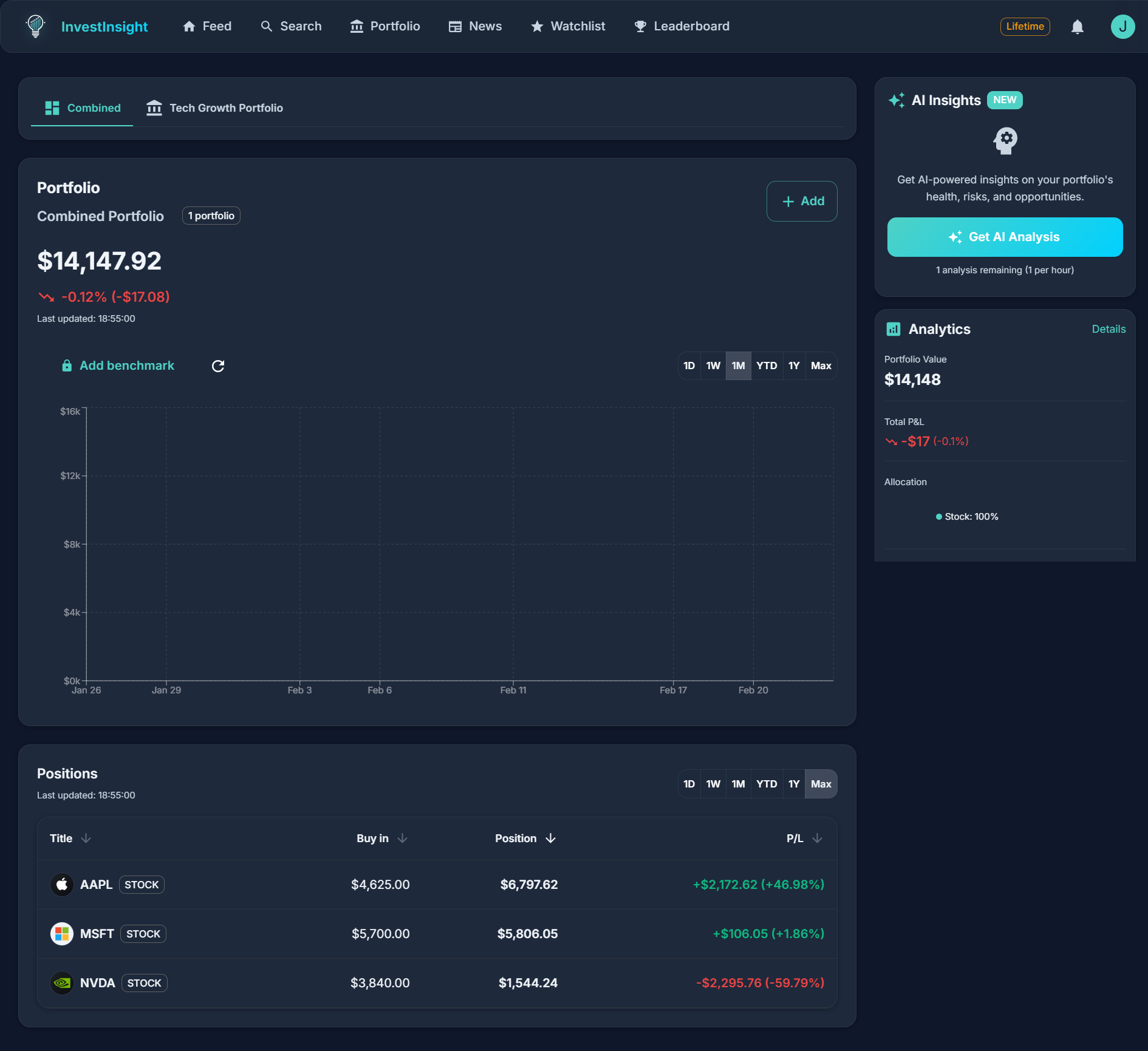
From here your holdings update automatically, so the picture you see reflects reality rather than a snapshot you last updated by hand. If you want the full feature breakdown, the Trading 212 portfolio tracker page walks through what syncs and how it’s displayed.
6. Track Your ISA and Invest Accounts the Right Way
Most UK Trading 212 users hold at least a Stocks & Shares ISA, and many also have an Invest account (a General Investment Account, or GIA). These are treated very differently for tax, so you should never blend them into one undifferentiated blob.
Why the separation matters
- ISA gains and dividends are sheltered from UK tax, within your annual allowance.
- Invest/GIA holdings are not sheltered – gains may be subject to Capital Gains Tax and dividends to Dividend Tax, depending on your allowances and circumstances.
Because the tax treatment differs, your decision-making differs too. Set each up as its own account inside your tracker so you can see ISA performance and Invest performance separately, while still getting a combined total when you want the big picture.
A practical habit: prioritise using your ISA allowance first, and keep an eye on unrealised gains in your Invest account so a future sale doesn’t hand you an avoidable tax surprise.
7. Get Your Dividends Under Control
For income-focused UK investors, dividends are often the whole point – yet they’re one of the hardest things to see clearly in a brokerage app. A dedicated dividend tracker transforms scattered payments into a proper income picture.
What good dividend tracking gives you
- A dividend calendar – a forward view of when your holdings are expected to pay, so income stops feeling random.
- Total income over time – monthly and annual dividend totals, not just individual payments.
- Yield on cost – how much income you earn relative to what you originally paid, which is far more meaningful than headline yield.
- Reinvestment visibility – if you reinvest, you can watch the compounding effect build.
When your Trading 212 account is synced, dividend events flow through automatically, so you spend your time reading the story rather than assembling it in a spreadsheet.
8. Benchmark Your Performance Against the Market
Here’s the uncomfortable but essential discipline: a portfolio that’s “up” isn’t necessarily good. If your holdings gained while a simple global index gained more, you may have taken extra risk for a worse result.
How to benchmark sensibly
- Pick a fair yardstick – commonly the S&P 500 for a US-heavy portfolio, or a global index if you’re broadly diversified.
- Compare over meaningful periods – a single volatile month tells you little; a year or more is more honest.
- Look at returns after including dividends (total return), not just price movement.
InvestInsight can chart your portfolio against a benchmark such as the S&P 500, turning a vague feeling into a clear line-versus-line answer. That single view often reframes how people invest – sometimes it validates stock-picking, and sometimes it’s a gentle nudge towards cheaper index funds.
9. Use AI Analysis to Spot What You’re Missing
Once your data is flowing, patterns become visible that are easy to miss position by position. InvestInsight’s AI portfolio analysis can summarise your concentration risk, sector and geographic tilts, and overlap between holdings – the kind of review a diligent investor should do periodically but rarely finds time for.
Treat AI output as a thinking partner, not a financial adviser. It’s excellent at surfacing questions – “you’re heavily weighted to a single sector” or “three of your funds hold the same mega-cap stocks” – and you remain the decision-maker.
10. Avoid the Common Mistakes
A tracker is only as good as the habits around it. These are the pitfalls that trip up Trading 212 investors most often.
- Confusing balance with performance. A rising balance during a rising market may mask underperformance. Always check against a benchmark.
- Ignoring dividends in your return. Price-only returns understate income investing. Use total return.
- Mixing ISA and Invest accounts. Blending them hides your tax position and distorts decisions.
- Letting a manual tracker rot. If you go manual, schedule updates – a stale tracker is worse than none because it feels authoritative while being wrong.
- Over-checking. Refreshing every hour encourages emotional, short-term decisions. Long-term investing rewards patience.
- Forgetting the wider picture. If you hold a pension or crypto elsewhere, tracking only Trading 212 gives you a partial view of your real net worth and risk.
11. Build a Simple, Repeatable Routine
You don’t need to become a full-time analyst. A light, consistent rhythm beats sporadic deep dives.
Weekly (about five minutes)
- Glance at your synced dashboard – total value, biggest movers, any new dividends.
- Note anything that surprises you, but resist knee-jerk trades.
Monthly (about fifteen minutes)
- Check performance versus your benchmark.
- Review your dividend calendar and income trend.
- Run an AI analysis to re-check concentration and diversification.
- Confirm your ISA and Invest split still matches your plan.
Quarterly or annually
- Reassess your allocation and whether you’re on track for your goals.
- Plan ISA contributions to make full use of your allowance.
- Rotate or revoke and regenerate your API key if you want to refresh your security hygiene.
Good investing is mostly boring maintenance done consistently. A tracker’s real job is to make that maintenance take minutes, not hours.
Conclusion
Trading 212 is a great place to buy and hold investments, but to truly track your Trading 212 portfolio you need more than the brokerage view: real returns, a proper dividend picture, honest benchmarking, and a combined look across your accounts. The good news is that in 2026 this is easier than ever – generate a read-only API key, connect it securely, and let your dashboard stay current on its own. The key stays encrypted, never has permission to trade or move money, and you can revoke it anytime.
If you’d like all of this in one place – auto-sync, a dividend calendar, S&P 500 benchmarking and AI analysis – try connecting your account with InvestInsight’s Trading 212 portfolio tracker and see your real picture in a few minutes. It’s the difference between watching a balance and actually understanding your money.